10 March 2014

How to increase speed of online video


This is normal stuff to play an online video much faster than the normal speed or in slow internet connection. Maximum online video broadcasting channel uses flash player, which is slower than the Html5 video broadcasting. Either, you can use html5 media player or use your own installed media player in PC. Let’s do this stuff using VLC media player, which is more popular media player.
There are same steps to increase speed as:
    1.       Open VLC media player
    2.       Open media->Stream

    3.       Open Network
    4.       Add your online video link(Example of youtube  video link is: http://www.youtube.com/watch?v=bDHFDK3x4Uo)
    5.       Click on Play. Take stream output as stream.
    6.       Now go to Playback->speed->faster. This will boost your speed of arrival frames. 

    7.       Increase speed up to 4.0x.

 you can also play a youtube video on html5:
    1.       Open http://youtube.com/html5
    2.       Do request for it default player.
    3.       Open http://youtube.com , now it will open as html5 player.     


Read More...

3 March 2014

How to schedule and limit your google forms

How to schedule and limit your google forms
Google Forms impose no limits. Any poll or survey created inside Google Forms has no expiration date and it can collect unlimited number of responses until the form owner decides to manually close* the form. But you can schedule these from and close it by trigger. Suppose anyone wants to set their form before 5 days and think after 5 days it will open for general user. For this situation you need to apply trigger on script editor by using some lines of Google Script.


Setting Expiration date and time of form:
Google script editor give flexibilty to set your expiration date and limiting your forms as following.
1.Go to google drive and click on existing or create new form
2.Inside editor click on Tools->Script editor.
3.Click on Form
4.Set DATE_OPEN   =  "2014-01-04 06:00". On this time your form will be visible.
5.Set DATE_CLOSE =  "2014-03-2 11:59". After this dste snd time your form will be invisible.
6.Set MAX_RESPONE   =  "200". This will set your maximum number of response.
7.(CNTL+S) save your script.

 Google Script for Setting expiration and Limiting response

DATE_OPEN   =  "2014-01-04 06:00"
DATE_CLOSE =  "2014-03-2 11:59"
MAX_RESPONE   =  "200"


/* Initialize the form, setup time based triggers */
function Initialize() {
 
  deleteTriggers_();
 
  if (DATE_OPEN !== "") {
    closeForm();
    ScriptApp.newTrigger("openForm")
    .timeBased()
    .at(parseDate_(DATE_OPEN))
    .create();
  }
 
  if (DATE_CLOSE!== "") {
    ScriptApp.newTrigger("closeForm")
    .timeBased()
    .at(parseDate_(FORM_CLOSE_DATE))
    .create();
  }
 
  if (MAX_RESPONE !== "") {
    ScriptApp.newTrigger("checkLimit")
    .forForm(FormApp.getActiveForm())
    .onFormSubmit()
    .create();
  }
 
}

/* Delete all existing Script Triggers */
function deleteTriggers_() { 
  var triggers = ScriptApp.getScriptTriggers(); 
  for (var i in triggers) {
    ScriptApp.deleteTrigger(triggers[i]);
  }
}

/* Send a mail to the form owner when the form status changes */
function informUser_(subject) {
  var formURL = FormApp.getActiveForm().getPublishedUrl();
  MailApp.sendEmail(Session.getActiveUser().getEmail(), subject, formURL); 
}

/* Allow Google Form to Accept Responses */
function openForm() {
  var form = FormApp.getActiveForm();
  form.setAcceptingResponses(true);
  informUser_("Your Google Form is now accepting responses");
}

/* Close the Google Form, Stop Accepting Reponses */
function closeForm() { 
  var form = FormApp.getActiveForm();
  form.setAcceptingResponses(false);
  deleteTriggers_();
  informUser_("Your Google Form is no longer accepting responses");
}

/* If Total # of Form Responses >= Limit, Close Form */
function checkLimit() {
  if (FormApp.getActiveForm().getResponses().length >= MAX_RESPONE ) {
    closeForm();
  } 
}

/* Parse the Date for creating Time-Based Triggers */
function parseDate_(d) {
  return new Date(d.substr(0,4), d.substr(5,2)-1,
                  d.substr(8,2), d.substr(11,2), d.substr(14,2));

}  

                                                           Thank you for Visiting blog.only4student.in
Read More...

How to create google form

Google has a large number of application, in which google form is one of them. Any one having gmail email address can create google form. This form helps you to create forms  contains validation and maintain mandatory(*)  fields. There are several steps as following:
      1.   Go to  drive.google.com(Login Required )
                   

      2.  Click on Create. After click a drop down menu appears.

      3. Click  on Form.
     4.  Choose your form theme.

     5.   Write your form title and description

     6.   Add your question title.
     7.  Set question type.
    8.  Apply validation.

    9.  Set required fields

   10.  Set form Confirmation message.

Thanks for Visiting blog.only4student.in

Read More...

28 February 2014

Windows Phone SDK installation problems

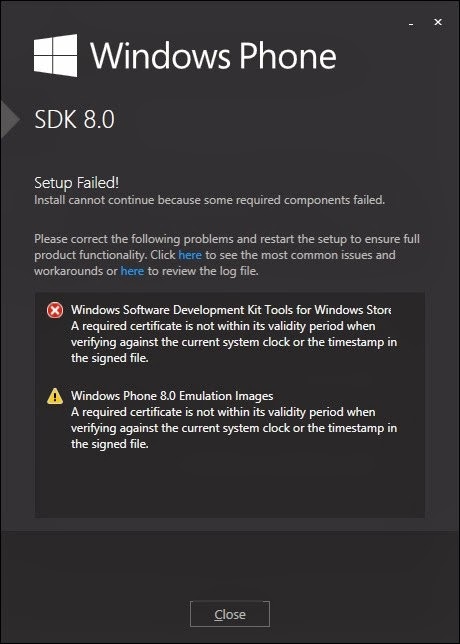
Generally programmers of windows apps faces problem while installing sdk 8.0, one of the major problem I would like to discuss with you. Most of the time we encounter following problem “Windows Phone 8 SDK: A required certificate is not within its validity period when verifying against the current system clock or the timestamp in the signed file in other word we generally see  windows Software Development Kit Tools for Windows Store . A required certificate is not within its validity period when verifying against the current system clock or the timestamp in the signed file”.


There are two solution of this problem:

A)    By changing local time.  Details are as follows:

Set the computer's date to 16 July 2013 or earlier, run installation, then update the date

to the present

     1.      Right click date and time in lower right corner of screen.

2.      Select Adjust Date/Time

3.      Click the Change Date and Time button.

4.      Select 16 July 2013 on the calendar.

5.      Click OK.

6.      Click OK.

7.      Run the installer again.

When installation is complete, use steps 1 through 6 to set the date to the current one.

B)    By downloading small (.msi) file generally 344KB to fix this issue.

1) Uninstall the partially installed Windows Phone SDK 8.0 if it currently installed on your computer.

2) Download the .msi and .cab files from the following 4 locations and save them to the same folder on your computer:

http://go.microsoft.com/fwlink/?LinkId=257143

http://go.microsoft.com/fwlink/?LinkId=257144

http://go.microsoft.com/fwlink/?LinkId=257145

http://go.microsoft.com/fwlink/?LinkId=257146

3) Go to the folder where you have saved downloaded file and run this file named “Win8SharedSDKTools.msi”.

4) After installing Win8SharedSDKTools.msi, re-run windows Phone SDk 8.0 setup and install like normal.

For more details about this bug you can visit Microsoft web http://support.microsoft.com/kb/2897627

                                              Thanks for visit us


Read More...

How to Bleach Microsoft windows 8 apps security


Today I have found how to bleach windows 8 apps security. Due to apps security you are able to see and modify the code file of windows 8 apps. There are several steps to bleach this security as following.
    1.    Enable Hidden items view in view control.
    2.    Goto C:/Program Files
    3.    Find WindowApps folder.
    4.   Send this folder to you external drive(i.e Pendrive, Memory card etc) with admin permission.


     5. Wait for complete. It might take long time.
     6. Open windowApps folder in your external drive, now you will be able to see each files of your installed Apps in your windows.

v  7. Now modify the code, if you want.
    8. Paste windowApps folder in your  C:/Program Files
    9. Run your modified Apps, now  you can see the changes.


Read More...

25 February 2014

vigenere cipher

Description

Vigenere  cipher is used for encrypting alphabetic text. In a Caesar cipher, each letter of the alphabet is shifted along some number of places; for example, in a Caesar cipher of shift 3, A would become DBwould become EY would become B and so on. The Vigenère cipher consists of several Caesar ciphers in sequence with different shift values.
To encrypt, a table of alphabets can be used, termed as Vigenère square, or Vigenère table. It consists of the alphabet written out 26 times in different rows, each alphabet shifted cyclically to the left compared to the previous alphabet, corresponding to the 26 possible Caesar ciphers. At different points in the encryption process, the cipher uses a different alphabet from one of the rows. The alphabet used at each point depends on a repeating key.
For example, suppose that the plaintext to be encrypted is:
cryptograph
The person sending the message chooses a keyword and repeats it until it matches the length of the plaintext, for example, the keyword "vein":
veinveinvei
Each row starts with a key letter. The remainder of the row holds the letters A to Z (in shifted order). Although there are 26 key rows shown, you will only use as many keys (different alphabets) as there are unique letters in the key string, here just 4 keys, {v,e,i,n}. For successive letters of the message, we are going to take successive letters of the key string, and encipher each message letter using its corresponding key row. Choose the next letter of the key, go along that row to find the column heading that matches the message character; the letter at the intersection of row and column,  is the enciphered letter.
For example, the first letter of the plaintext, c, is paired with v, the first letter of the key. So use row v and column c of the Vigenère square, namely v. Similarly, for the second letter of the plaintext, the second letter of the key is used; the letter at row r and column e is v. The rest of the plaintext is enciphered in a similar fashion:
Plaintext:
cryptograph
Key:
veinveinvei
Ciphertext:
Xvgcojoevtb
Decryption is performed by going to the row in the table corresponding to the key, finding the position of the ciphertext letter in this row, and then using the column's label as the plaintext. For example, in row v (from vein), the ciphertext v appears in column c, which is the first plaintext letter. Next we go to row e (from vein), locate the ciphertext v which is found in column r, thus r is the second plaintext letter.

Implementation in c++

#include<iostream.h>
#include<conio.h>
#include<string.h>
#include<stdlib.h>
void main(){
clrscr();
char *ptext,*cih,*key,alp[]={'a','b','c','d','e','f','g','h','i','j','k','l','m','n','o','p','q','r','s','t','u','v','w','x','y','z'};
int padd[50],kadd[50],padd1[50],kadd1[50],keyval,pval,i;
cout<<"\nEnter Plain text:";
cin>>ptext;
cout<<"\nEnter Key:";
cin>>key;
pval=strlen(ptext);
keyval=strlen(key);
for(i=0;i<pval;i++){
key[i]=key[i%keyval];
}
int count=0,count1=0;
while(count<pval){
for(i=0;i<26;i++){
if(ptext[count]==alp[i]){
  padd[count]=i;
for(int j=0;j<26;j++){
  if(key[count]==alp[j]){
    padd[count]=padd[count]+j;
                   }
            }
  }
}
count++;
}
for(i=0;i<pval;i++){
kadd[i]=padd[i]%26;
}
cout<<"\nCipher Text will be:";
for(i=0;i<pval;i++){
cih[i]=alp[kadd[i]];
cout<<alp[kadd[i]];
}
while(count1<pval){
for(i=0;i<26;i++){
if(cih[count1]==alp[i]){
  padd1[count1]=i;
for(int j=0;j<26;j++){
  if(key[count1]==alp[j]){
    padd1[count1]=padd1[count1]-j;
                   }
            }
  }
}
count1++;
}
for(i=0;i<pval;i++){
kadd1[i]=padd1[i]%26;
if(kadd1[i]<0){
kadd1[i]+=26;
}
}
cout<<"\nOriginal Text will be:";
for(i=0;i<pval;i++){
cout<<alp[kadd1[i]];
}
getch();
}

Output

Enter Plain text: cryptograph
Enter key: vein
Cipher Text will be: Xvgcojoevtb
Original Plain text will be:cryptograph

Download Source code: Vigenere in c++
Read More...

23 February 2014

Find rank of matrices using SR modulus Method


In engineering mathematics it is not easy to find rank of matrices. SR Modulus method give us flexibility and  easy way to find rank of matrices. This method is working under the project “LOCO POCO SOCO”, developing by S.K. Chakravarti since 2009.

SR Modulus method:

If a matrix A= , then find the rank of matrix A.

B=A%(Prime Number P)
Let prime number be 2. Then matrix B will be
B=
Apply elementary row and column elimination. Try to do (n-1) elements of  any one row or column of matrix B to be 0.
If Maximum elements are in the form of 2n,3n,5n,7n…..,  then take prime number P as upper prime.
Apply these Modulus and elimination till every elements gets  {-1,0,1}.
Rank(A)=Number of none zero rows or columns of matrix B.

 Download .pdf file: Click Here

Example:
Given that a 3x3 matrix A=. Find the Rank of matrix A.
Solution:
Applying modulus 2, then B=A%2.
B=
Number of none zero rows or column = 2
Hence, Rank(A)=2    ANS.

If you have any problem regard this you can contact me via comments or email.


Read More...

Free chat without Internet connection in windows

Free chat without Internet connection

Steps:
1.       Open Run in windows PC , to open it press  windows  key with R key  simultaneously
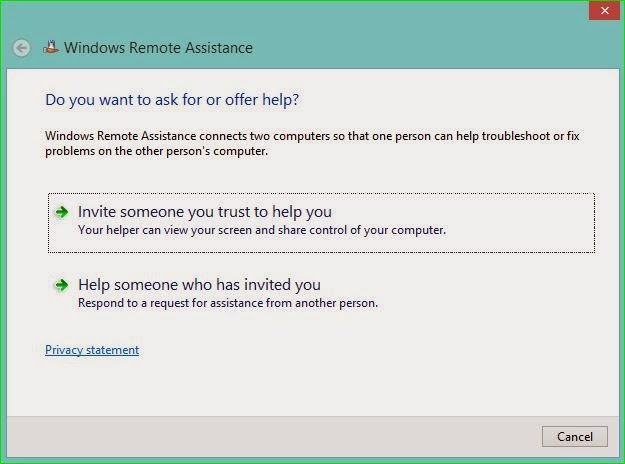
2.        Now type  MSRA  in Run  prompt.


3.       Now there  you will able to see following screen
                                          
4.       Click on Invite someone, to call your friend to chat with you.
And select appropriate action according to your choice, how you want to deliver chat file to your friend. In this case I will like to go with save invitation file.


5.       Now send this file to your friend and password also to access this (typically pen drive is best media to deliver to your friend) . And you are done with this and ask your friend to run this file.


6.       Please give authentication when you receive confirmation message.  Now start chat.


Attention : you will able to share your screen also on making some setting. 
To make local connection use hotspot software or make ad-hoc network .

7.       Please like us on facebook at https://www.facebook.com/Only4student.in to know more updates. Thanks for coming.


Read More...