4 February 2016

Python crawler controller


I work on a project where I have written 20+ crawlers and the crawlers are running 24/7 (with good amount of sleep). Sometimes, I need to update / restart the server. Then I have to start all the crawlers again. So, I have written a script that will control all the crawlers. It will first check if the crawler is already running, and if not, then it will start the crawler and the crawler will run in the background. I also saved the pid of all the crawlers in a text file so that I can kill a particular crawler immediately when needed.

Here is my code :

import shlex
from subprocess import Popen, PIPE

site_dt = {'Site1 Name' : ['site1_crawler.py', 'site1_crawler.out'], 
'Site2 Name' : ['site2_crawler.py', 'site2_crawler.out']}

location = "/home/crawler/"

pidfp = open('pid.txt', 'w')


def is_running(pname):
    p1 = Popen(["ps", "ax"], stdout=PIPE)
    p2 = Popen(["grep", pname], stdin=p1.stdout, stdout=PIPE)
    p1.stdout.close()  # Allow p1 to receive a SIGPIPE if p2 exits.
    output = p2.communicate()[0]
    if output.find('/home/crawler/'+pname) > -1:
        return True
    return False


def main():
    for item in site_dt.keys():
        print item
        if is_running(site_dt[item][0]) is True:
            print site_dt[item][0], "already running"
            continue
        cmd = "python " + location + site_dt[item][0] + " -l info"   
        outfile = "log/" + site_dt[item][1] 
        fp = open(outfile, 'w')
        
        pid = Popen(shlex.split(cmd), stdout=fp).pid
        
        print pid
        print
        pidfp.write(item + ": " + pid + "\n")
        
    pidfp.close()
    
    
if __name__ == "__main__":
    main()

If you feel that there is scope for improvement, please comment.
Read More...

Prime Number Generator in Python using Sieve Method


I have implemented a prime number generator in Python using Sieve of Eratosthenes. Here is my code:
import math

high = 10000
root = int(math.sqrt(high) + 1.0)

ara = [x % 2 for x in xrange(0, high)]

ara[1] = 0
ara[2] = 1

x = 3
while x <= root:        
    if ara[x]:
        z = x * x
        while z < high:             
            ara[z] = 0
            z += (x + x)        
    x += 2
        
prime = [x for x in xrange(2, len(ara)) if ara[x] == 1]
print prime
I am looking for ideas to make my code faster. I tested my Python program using the code for solving a problem named Prime Generator in SPOJ. I could solve the problem correctly that took 3 seconds time and 3.8 MB memory. I am posting another code I found here. This one is similar implementation to mine but more Pythonic and much faster:
nroot = int(math.sqrt(n))
sieve = [True] * (n+1)
sieve[0] = False
sieve[1] = False

for i in xrange(2, nroot+1):
    if sieve[i]:
        m = n/i - i
        sieve[i*i: n+1:i] = [False] * (m+1)

sieve = [i for i in xrange(n+1) if sieve[i]]
I updated the above code and now it's 20% faster! :)
nroot = int(math.sqrt(n))
sieve = [True] * (n+1)
sieve[0] = False
sieve[1] = False
sieve[4: n+1:2] = [False] * (n / 2 - 1)
for i in xrange(2, nroot+1):
    if sieve[i]:
        m = (n/i - i) / 2
        sieve[i*i: n+1:i+i] = [False] * (m+1)

sieve = [i for i in xrange(n+1) if sieve[i]]
Read More...

How to get image size from url

Today I needed to get image size (width and height) from image urls. I am sharing my python code here.

import requests
from PIL import Image
from io import BytesIO


def get_image_size(url):
    data = requests.get(url).content
    im = Image.open(BytesIO(data))    
    return im.size


if __name__ == "__main__":
    url = "https://blogger.googleusercontent.com/img/b/R29vZ2xl/AVvXsEjcw6adFki0Rnm_aA1YNYXwLWCTzPKjLbG9hI0QweVAoLlNWzK2NQHez4RMhvh9A6WS1eSccU5Swsk2bewxXa9j0rYO3Gl7Jw8ht45n72SONTlwdALyDYJqWtcsW0IY6HFTmFjDuV1yvsRF/s1600/sbn_pic_2.jpg"
    width, height = get_image_size(url)
    print width, height

I used pillow - which is a PIL fork.

Feel free to comment if you have any suggestion to improve my code.
Read More...

Code School Python Courses

As Python is getting more and more popular and becoming the de facto standard for starting to learn programming, we can see increasing amount of online content to learn Python. Last week got an email form Code School team to check out their couple of new Python courses. I spent around 30 minutes watching the videos, checkout out the exercises. The exercises are good, and can be done online. They also prepared the videos with care. But one thing that bothers me, the lecture is kind of robotic. I didn't feel anything special, in fact didn't feel the connection to the teacher that I used to feel in other courses in Coursera and Udacity. Anyway, Python beginners can check those courses:
1. Try Python
2. Flying through Python
Read More...

9 December 2014

Find rank of matrix using SR modulus Method

Find rank of matrix using SR modulus Method:
In engineering mathematics it is not easy to find rank of matrices. SR Modulus method give us flexibility and  easy way to find rank of matrices. This method is working under the project “LOCO POCO SOCO”, developing by S.K. Chakravarti since 2009.
SR Modulus method:
If a matrix A= , then find the prime modulus of matrix A.
B=A%(Prime Number P)
Let prime number be 2. Then matrix B will be
B=
Apply elementary row and column elimination. Try to do (n-1) elements of  any one row or column of matrix B to be 0.
If Maximum elements are in the form of 2n,3n,5n,7n…..,  then take prime number P as upper prime.
Apply these Modulus and elimination till every elements gets  {-1,0,1}.
Rank(A)=Number of none zero rows or columns of matrix B.

Example:
Given that a 3x3 matrix A=. Find the Rank of matrix A.
Solution:
Applying modulus 2, then B=A%2.
B=~~
Number of none zero rows or column = 2
Hence, Rank(A)=2    ANS.
If you have any problem regard this you can contact me via comments are email.


Read More...

All the Wget Commands You Should Know:Downloader

How do I download an entire website for offline viewing? How do I save all the MP3s from a website to a folder on my computer? How do I download files that are behind a login page? How do I build a mini-version of Google?
Wget is a free utility – available for Mac, Windows and Linux (included) – that can help you accomplish all this and more. What makes it different from most download managers is that wget can follow the HTML links on a web page and recursively download the files. It is the same tool that a soldier had used to download thousands of secret documents from the US army’s Intranet that were later published on the Wikileaks website.


Spider Websites with Wget – 20 Practical Examples
Wget is extremely powerful, but like with most other command line programs, the plethora of options it supports can be intimidating to new users. Thus what we have here are a collection of wget commands that you can use to accomplish common tasks from downloading single files to mirroring entire websites. It will help if you can read through the wget manual but for the busy souls, these commands are ready to execute.
1. Download a single file from the Internet
wget http://example.com/file.iso
2. Download a file but save it locally under a different name
wget ‐‐output-document=filename.html example.com
3. Download a file and save it in a specific folder
wget ‐‐directory-prefix=folder/subfolder example.com
4. Resume an interrupted download previously started by wget itself
wget ‐‐continue example.com/big.file.iso
5. Download a file but only if the version on server is newer than your local copy
wget ‐‐continue ‐‐timestamping wordpress.org/latest.zip
6. Download multiple URLs with wget. Put the list of URLs in another text file on separate lines and pass it to wget.
wget ‐‐input list-of-file-urls.txt
7. Download a list of sequentially numbered files from a server
wget http://example.com/images/{1..20}.jpg
8. Download a web page with all assets – like stylesheets and inline images – that are required to properly display the web page offline.
wget ‐‐page-requisites ‐‐span-hosts ‐‐convert-links ‐‐adjust-extension http://example.com/dir/file
Mirror websites with Wget
9. Download an entire website including all the linked pages and files
wget ‐‐execute robots=off ‐‐recursive ‐‐no-parent ‐‐continue ‐‐no-clobber http://example.com/
10. Download all the MP3 files from a sub directory
wget ‐‐level=1 ‐‐recursive ‐‐no-parent ‐‐accept mp3,MP3 http://example.com/mp3/
11. Download all images from a website in a common folder
wget ‐‐directory-prefix=files/pictures ‐‐no-directories ‐‐recursive ‐‐no-clobber ‐‐accept jpg,gif,png,jpeg http://example.com/images/
12. Download the PDF documents from a website through recursion but stay within specific domains.
wget ‐‐mirror ‐‐domains=abc.com,files.abc.com,docs.abc.com ‐‐accept=pdf http://abc.com/
13. Download all files from a website but exclude a few directories.
wget ‐‐recursive ‐‐no-clobber ‐‐no-parent ‐‐exclude-directories /forums,/support http://example.com
Wget for Downloading Restricted Content
Wget can be used for downloading content from sites that are behind a login screen or ones that check for the HTTP referer and the User Agent strings of the bot to prevent screen scraping.
14. Download files from websites that check the User Agent and the HTTP Referer
wget ‐‐refer=http://google.com ‐‐user-agent=”Mozilla/5.0 Firefox/4.0.1″ http://nytimes.com
15. Download files from a password protected sites
wget ‐‐http-user=labnol ‐‐http-password=hello123 http://example.com/secret/file.zip
16. Fetch pages that are behind a login page. You need to replace user and password with the actual form fields while the URL should point to the Form Submit (action) page.
wget ‐‐cookies=on ‐‐save-cookies cookies.txt ‐‐keep-session-cookies ‐‐post-data ‘user=labnol&password=123′ http://example.com/login.php
wget ‐‐cookies=on ‐‐load-cookies cookies.txt ‐‐keep-session-cookies http://example.com/paywall
Retrieve File Details with wget
17. Find the size of a file without downloading it (look for Content Length in the response, the size is in bytes)
wget ‐‐spider ‐‐server-response http://example.com/file.iso
18. Download a file and display the content on screen without saving it locally.
wget ‐‐output-document – ‐‐quiet google.com/humans.txt
19. Know the last modified date of a web page (check the Last Modified tag in the HTTP header).
wget ‐‐server-response ‐‐spider http://www.labnol.org/
20. Check the links on your website to ensure that they are working. The spider option will not save the pages locally.
wget ‐‐output-file=logfile.txt ‐‐recursive ‐‐spider http://example.com

Wget – How to be nice to the server?

The wget tool is essentially a spider that scrapes / leeches web pages but some web hosts may block these spiders with the robots.txt files. Also, wget will not follow links on web pages that use the rel=nofollow attribute.
You can however force wget to ignore the robots.txt and the nofollow directives by adding the switch ‐‐execute robots=off to all your wget commands. If a web host is blocking wget requests by looking at the User Agent string, you can always fake that with the ‐‐user-agent=Mozilla switch.
The wget command will put additional strain on the site’s server because it will continuously traverse the links and download files. A good scraper would therefore limit the retrieval rate and also include a wait period between consecutive fetch requests to reduce the server load.
wget ‐‐limit-rate=20k ‐‐wait=60 ‐‐random-wait ‐‐mirror example.com
In the above example, we have limited the download bandwidth rate to 20 KB/s and the wget utility will wait anywhere between 30s and 90 seconds before retrieving the next resource.
Finally, a little quiz. What do you think this wget command will do?
wget ‐‐span-hosts ‐‐level=inf ‐‐recursive dmoz.org


Read More...

6 October 2014

The smarter online payment gateway: Google wallet


 -

Get more online e-commerce options out of your wallet on your online WordPress shop. Pay fast. Save smarter. Use the same wallet whether buying in-store or online.
Google Wallet (or Google Checkout) is a service similar to PayPal that allows buying products online via Google account. Online shoppers often use Google for searching of products, which they want to buy and Google Wallet will help to do it.
Integration of Google Wallet is done online and is easy to configure. Benefits of Google Wallet: easy in setup, ready to receive payment at once; guarantees safe money transactions on Google Servers;
enables Google’s users to buy goods at your store; secures your personal data due to strict privacy policy; user-friendly. There is no need to re-enter you account information every time you want to buy something online. Your data is kept in system. Google Wallet charges fee for money transaction, but it is not higher then the other major merchants have. Google Checkout has NO: sign-up fee monthly fee gateway fee
Make sure that you use US Dollars or Pounds because Google Wallet Payment Gateway supports only these two currencies. Otherwise buyers will receive an error when proceeding to Google Wallet from WordPress Shopping Cart

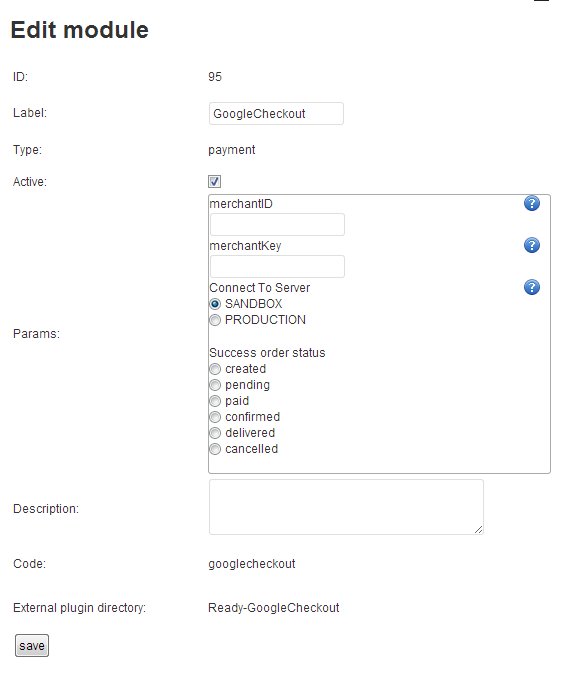
In the settings of the payment system you will see this settings

1
Read More...